抱歉,您的浏览器无法访问本站
本页面需要浏览器支持(启用)JavaScript
了解详情 >

Life is a tragedy in close up and a comedy in a long shot.

人生近看是悲剧,远看是喜剧

教程前置

✔ Cloudflare Workers 上的免费无服务器正常运行时间监控/状态页面,具有特定于地理位置的检查

提醒

由于使用了 Workers 来提供运行检查,所以请求数将会有较大的增加。

Demo: https://uptimeflare.pages.dev/

开始

1.申请 用于编辑Workers 的Key

如果先前有创建,可以使用。

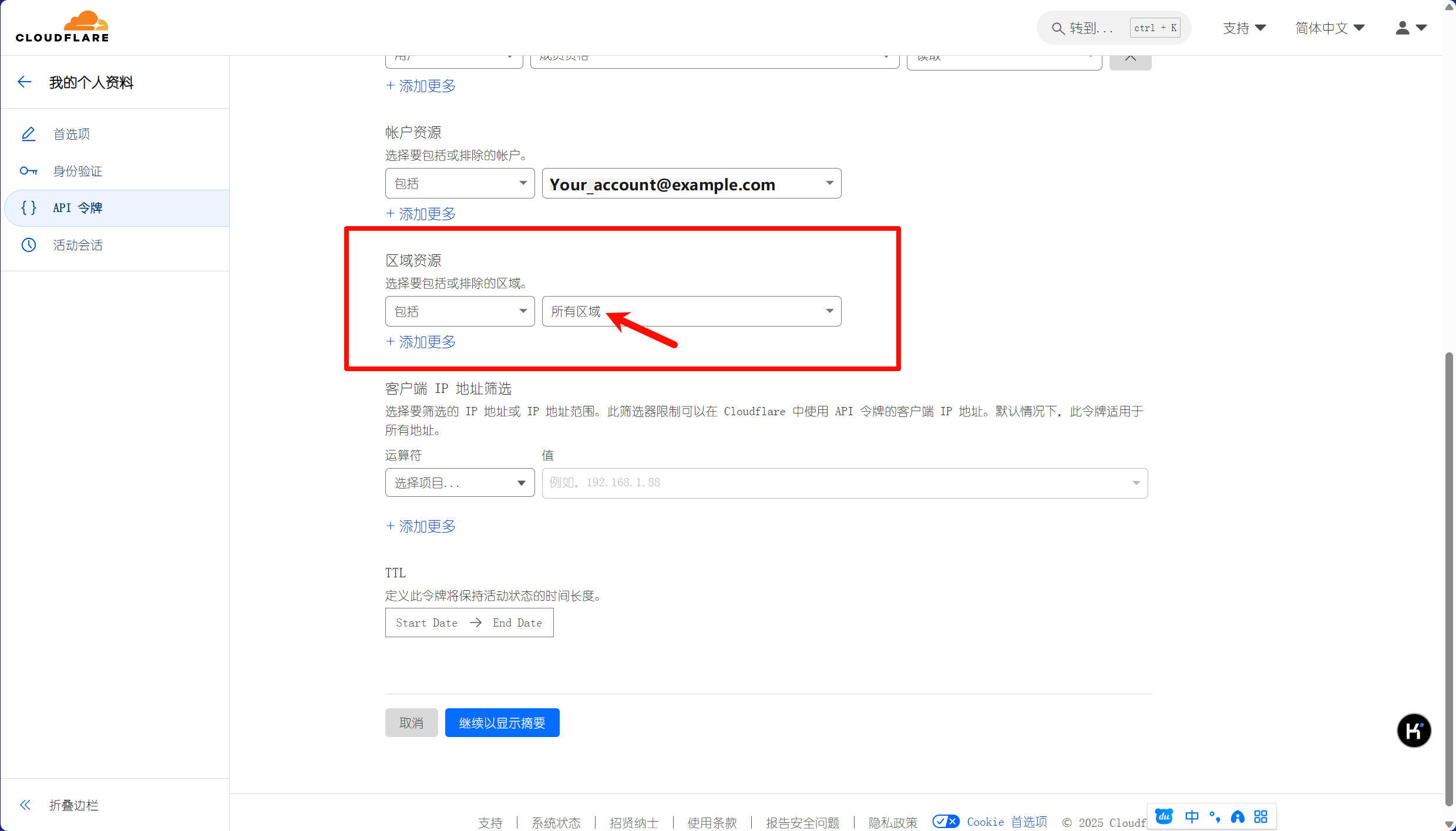
此处申请用于构建的api令牌

接着下一步,会显示出创建出的api,复制保存。

2.使用该仓库模板

需要设置为私有,防止api泄露
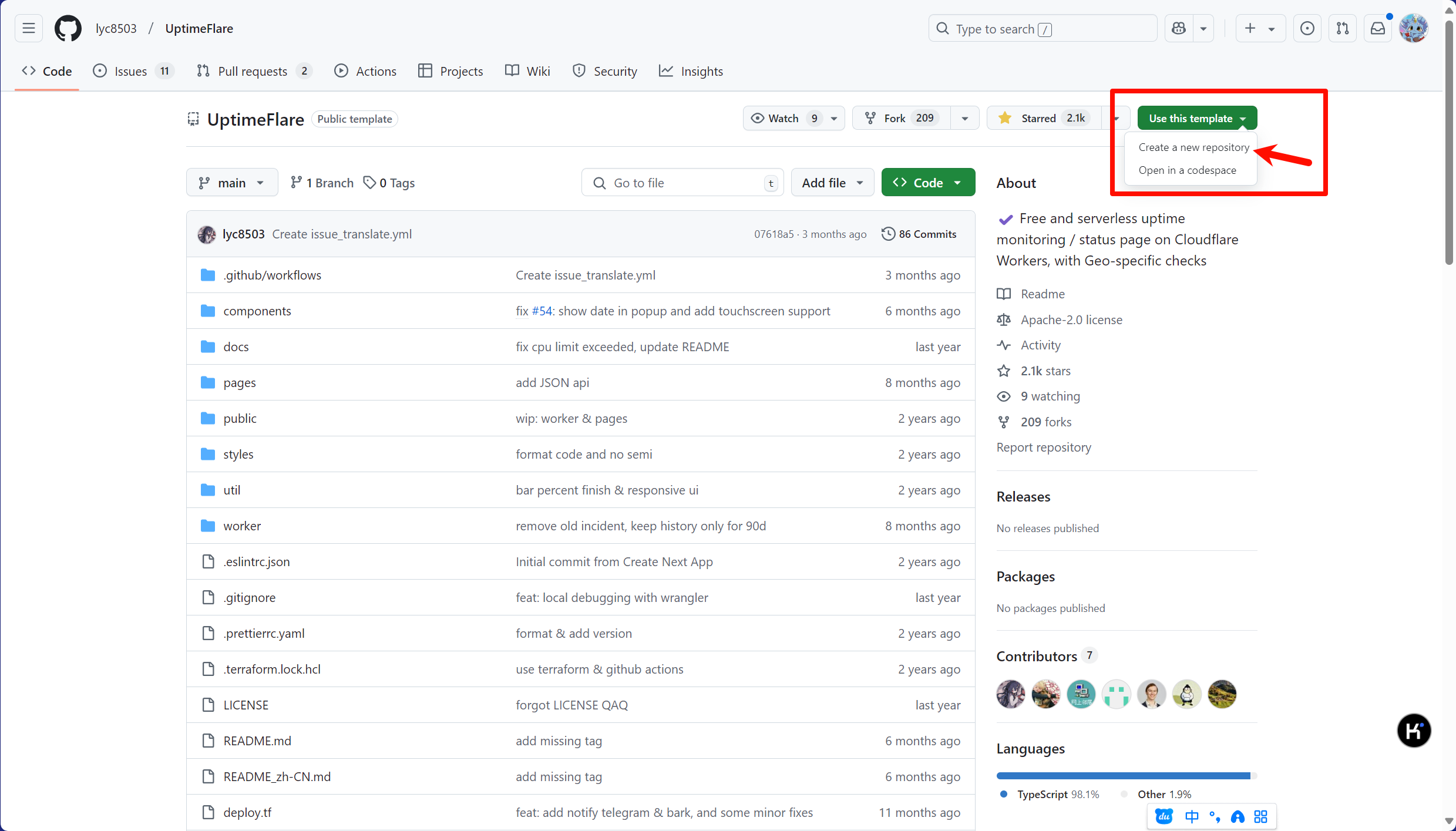
新建好仓库后,在Settings - Secrets and variables - Actions处新建一个密钥,名字为CLOUDFLARE_API_TOKEN,将刚才保存的api放进去即可。

配置

打开文件uptime.config.ts

页面配置

1
2
3
4
5
6
7
8
const pageConfig = {
title: "lyc8503's Status Page",
links: [
{ link: 'https://github.com/lyc8503', label: 'GitHub' },
{ link: 'https://blog.lyc8503.site/', label: 'Blog' },
{ link: 'mailto:me@lyc8503.site', label: 'Email Me', highlight: true },
],
}
项目 说明
title 网站标题
links 顶部外部链接

根据 json 严格的语法规则,应该要严格地按照上方格式来填写。

补充

对于 json 排版可以有两种:

1
2
{ link: '...', label: '...'},
{ link: '...', label: '...'}

亦或者是

1
2
3
4
5
6
7
8
{
link: '...',
label: '...'
},
{
link: '...',
label: '...'
}

并且单引号双引号都可以被识别

监控配置

1
2
3
4
5
6
7
8
9
10
11
12
13
14
15
16
17
18
19
20
21
22
23
24
25
const workerConfig = {
kvWriteCooldownMinutes: 3,
passwordProtection: 'username:password',
monitors: [
{
id: 'foo_monitor',
name: 'My API Monitor',
method: 'GET',
target: 'https://www.google.com'
},
{
id: 'test_tcp_monitor',
name: 'Example TCP Monitor',
method: 'TCP_PING',
target: '1.2.3.4:22'
},
// You can continue to define more monitors here...
],
notification: {
//...
},
callbacks: {
//...
},
}

监控配置(monitors)

监控的配置在 monitors 中配置,如上文,按照 json 语法进行编写。

单个监控的完整配置如下文

1
2
3
4
5
6
7
8
9
10
11
12
13
14
15
16
17
18
19
20
21
22
23
24
25
26
27
28
29
{
id: 'foo_monitor',
// `name` is used at status page and callback message
name: 'My API Monitor',
// `method` should be a valid HTTP Method or "TCP_PING" for TCP port monitor
method: 'POST',
// `target` is a valid URL for HTTP or hostname:port for TCP
target: 'https://example.com',
// [OPTIONAL] `tooltip` is ONLY used at status page to show a tooltip
tooltip: 'This is a tooltip for this monitor',
// [OPTIONAL] `statusPageLink` is ONLY used for clickable link at status page
statusPageLink: 'https://example.com',
// [OPTIONAL] `expectedCodes` is an array of acceptable HTTP response codes, if not specified, default to 2xx
expectedCodes: [200],
// [OPTIONAL] `timeout` in millisecond, if not specified, default to 10000
timeout: 10000,
// [OPTIONAL] headers to be sent with HTTP monitor
headers: {
'User-Agent': 'Uptimeflare',
Authorization: 'Bearer YOUR_TOKEN_HERE',
},
// [OPTIONAL] body to be sent with HTTP monitor
body: 'Hello, world!',
// [OPTIONAL] if specified, the HTTP response must contains the keyword to be considered as operational.
responseKeyword: 'success',
// [OPTIONAL] if specified, the check will run in your specified region,
// refer to docs https://github.com/lyc8503/UptimeFlare/wiki/Geo-specific-checks-setup before setting this value
checkLocationWorkerRoute: 'https://xxx.example.com',
},
项目(带*为必选) 说明
*id id应该是唯一的,如果id保持不变,历史记录将被保留(有大用!)
*name name用于状态页面和回调消息
*method method应该是TCP端口监视器的有效HTTP方法(例如GET)或TCP_PING
*target HTTP的有效URL或TCP的hostname:port
tooltip 用于状态页面显示工具提示
statusPageLink 用于状态页面上的可点击链接
expectedCodes 一个可接受的HTTP响应代码数组,如果未指定,默认为2xx
timeout 超时时间
headers 与HTTP监视器一起发送的标头
body 将与HTTP监视器一起发送
responseKeyword 如果指定,HTTP响应必须包含被视为可操作的关键字
checkLocationWorkerRoute 如果指定,检查将在您指定的区域运行

当然,这边建议只需要写必选即可,其他不写。

通知配置(notification)

这个要用到Tg,因此我就不写了,具体看文档。

Setup notification · lyc8503/UptimeFlare Wiki

Callbacks

默认即可,无需理会

部署

等待Github Action自动部署即可,建议绑定一个自己的域名

拓展

嵌入为 iframe

在部署页面后,链接末尾加#id即可

效果:

P

JSON格式数据

链接后加/api/data即可

1
2
3
4
5
6
7
8
9
10
11
12
13
14
15
16
17
18
19
20
{
"up": 6, // There're currently 6 up monitors...
"down": 1, // ...and 1 down monitors
"updatedAt": 1719764731, // Last updated timestamp
"monitors": {
"www": { // Key is `id` in config
"up": true, // Current status (boolean)
"latency": 65, // Latency at last monitor
"location": "SIN", // Datacenter used at last monitor
"message": "OK" // Description of current status (Error message in case of DOWN)
},
"homelab": {
"up": false,
"latency": 1896,
"location": "SJC",
"message": "HTTP response doesn't contain the configured keyword"
},
//......
}
}

评论

😉在此处留下你的评论,输入邮箱可以获得回复
🥳本站使用weavatar.com的头像服务
🧐使用markdown语法书写
⚠️提醒邮箱是:blog@245179.xyz 可能会被识别成垃圾邮件?
📷上传图片请自备图床